Why deposit your research in Minerva Access?
Minerva Access is the University of Melbourne's institutional repository for research publications. Using the repository, you can often make your research outputs open access at no cost to you. This brings various benefits, including:
- Ensures your work is discoverable.
Minerva Access is indexed in Google and other search platforms. - Helps you make the most of your rights as an author.
Most academic journals and book publishers will allow you to share the Author Accepted Manuscript (AAM) of your article, paper, or a book chapter open access in a repository. - Fulfils grant funder requirements.
Depending on your grant provide and the embargo periods required, making your research open in Minerva Access can be a pathway to fulfilling your funder requirements. Find out more on our Funder Open Access Policies page. - Meets the expectations of the University's Principles for Open Access.
Updated in July 2023, our Principles for Open Access to Research Outputs at Melbourne outline the University's preferred pathways to open access. These include repository open access in Minerva Access. - Enable direct downloads from your Find an Expert profile.
If you have deposited a file (a PDF or Word document) in Minerva Access and have an active Find an Expert profile, a download link will appear on the output's Find an Expert record.
Three ways to deposit your research
University of Melbourne staff and students have three easy options for depositing research outputs in Minerva Access. Just choose whichever option works best for your existing workflows.
- Deposit using the Research Outputs ServiceNow form.
Provide publication details (citation or DOI) and either attach your Author Accepted Manuscripts (AAMs) or provide open access URLs. Artistic and practice-based outputs can be submitted using the NTRO ServiceNow form. - Deposit by sending an email to the Research Outputs team.
In your email to research-outputs@unimelb.edu.au, include publication details (citation or DOI) and either attach your AAMs or provide open access URLs. - Deposit directly in Elements.
Current staff can log in to Elements, our research outputs management platform, and deposit directly. See the instructional video below for guidance.
Which version to deposit
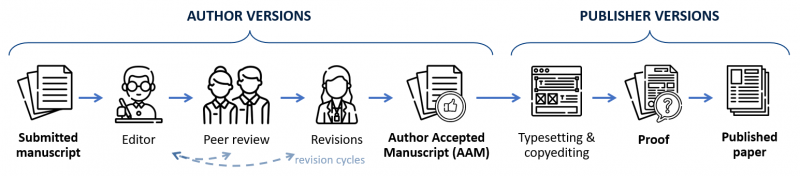
Research outputs such as journal articles, conference papers, and book chapters usually go through several key stages. Versions tend to include: the submitted manuscript, the Author Accepted Manuscript (AAM), the proof, and the published paper (or Version of Record). You can find out more about these versions below.
- If you are depositing a research output that was published open access, you can upload the published version or provide the URL.
The Minerva Access team will link to your publication's open access location. - If you are depositing a paywalled publication, you should upload the Author Accepted Manuscript (AAM).
This peer-reviewed and revised manuscript version can usually be made open access after an embargo. If a rights retention statement was included in the submitted manuscript, this version can be made open access immediately upon publication.
If your publication was funded in full or in part by an NHMRC or ARC grant, or by another funder with an open access policy, you are expected to make either the published version or the AAM open access. Find out more on our Funder Open Access Policies page.
-
The submitted manuscript, or submitted version, is the first version sent to the journal or book publisher. This version has not been peer reviewed. It can usually be shared freely on a preprint server, and may already exist as a preprint prior to submission.
Making this version open access does not fulfil funder open access requirements or the Principles for Open Access to Research Outputs at Melbourne. It is usually preferable to share this version on a preprint server than in Minerva Access.
-
-
After the publisher's typesetting and copy editing, the author will receive a copy of the publisher's proof to review. This will usually look like the final published version, but with additional markup.
This version cannot substitute for the AAM and will be considered a published version. It is preferable to upload the AAM and/or the published version.
-
The published version of a research output, also called the Version of Record (VoR), is usually a PDF available through the publisher's website (either open access or paywalled). It is the final version of a publication containing all revisions and copy edits, and using the publisher's standard formatting and typesetting, complete with copyright statements and a DOI.
Unless it was published open access and uses an open licence, such as a Creative Commons licence, this version usually cannot be deposited in Minerva Access or shared publicly.
Preparing research outputs for deposit
Full details of how to prepare files for deposit can be found in the Knowledge Base article "Preparing files for deposit to Minerva Access."
Consider the following tips for creating high-quality, accessible manuscripts:
- The preferred formats for document are Word (.docx or .doc) or PDF (.pdf). Where possible, we encourage the deposit of Word documents for accessibility, as they are easier for screen readers.
- When preparing manuscripts for submission, ensure you have removed all personal information. This includes your phone number and address, which may appear on the coverpage. Remember to also clear all comments and track changes.
- You can make formatting improvements to your manuscripts to enhance their look and feel, or to add a citation to the final published version. You cannot, however, mimic the publisher’s typesetting, replicate their copyedits, or make other changes to the content of an accepted manuscript.
- Ensure your document is accessible to users with disabilities. This includes:
- Adding alternative text to images, diagrams, and graphs.
- Using built-in, structured headings (H1, H2, H3...) throughout the document.
- Ensuring high contrast between text and background colours, while making figures and diagrams colourblind friendly.
- To learn more about creating accessible documents, see:
- Harvard University's Accessible Documents guide, with practical advice on creating accessible documents of various kinds.
- The University of Minnesota's guide to 7 core accessibility skills.
- Microsoft's advice for creating accessible Word documents.
- Nitro's advice for creating accessible PDFs.
Deposit policies and embargo periods
When you deposit your research in Minerva Access, the repository team will check publisher permissions and copyright before making any files public. They will apply and manage any embargo periods that may be required.
Most academic journals will allow the Author Accepted Manuscript (AAM) of an article to be made open access in an institutional repository. Embargoes of between 6 and 36 months are usually required, unless a rights retention statement has been used.
Many academic book publishers will likewise allow the AAM of a single chapter (or the author's own chapter in an edited volume) to be made open access in a repository. Embargoes of between 12 or 24 months will usually apply. The same is usually true of published conference papers.
Checking publishers' deposit policies
You may wish to consider publishers' sharing policies and embargo periods when deciding where to publish. To determine when a manuscript (submitted or accepted) can be shared in Minerva Access, look for policies relating to sharing in an institutional repository or non-commercial repository.
Publishers usually specify their deposit policies on their website. This may be part of an open access policy, sharing policy, or self-archiving policy. These will determine which versions of a publication can be shared, when, and in what locations.
If your work has been accepted for publication, your publishing contract should also detail your sharing rights. The contract should specify where and when you're allowed to share different versions of your work.
The Open Policy Finder is an online database of open access policies. It can be searched by publisher name or journal title. Publisher or journal records will describe where and when different versions of an output can be shared. For further guidance and instructional videos, see the Open Policy Finder Help pages.
Using Elements to deposit in Minerva Access
Elements is the University's publications management platform. Records are fed into Find an Expert profiles and the Researcher Dashboard. When files or open access URLs are deposited, records are sent to Minerva Access.
For step-by-step instructions on depositing your research using Elements, see "Depositing to Minerva Access" on the Research Gateway.
The below instructional video shows you how to upload your publications to Minerva Access using Elements.
Make Your Research Open In Minerva Access from University of Melbourne Library on Vimeo.
Further support
If you require assistance depositing to Minerva Access or have enquiries relating to the Minerva Access platform or existing records, please email, contact the Research Outputs team at research-outputs@unimelb.edu.au.
For enquiries relating to the Deposit of Theses or existing Thesis records, please email minerva-access@unimelb.edu.au.
More information on open access can be found on our Open Scholarship website. For further support, please email your discipline's Liaison Librarians.
Page last updated 3 June 2025.
The icons used in the publication versions diagrama above were created by Freepik and are used under the Flaticon Licence.